
Are QR-Code Parking Payment Scams Common in US Cities?
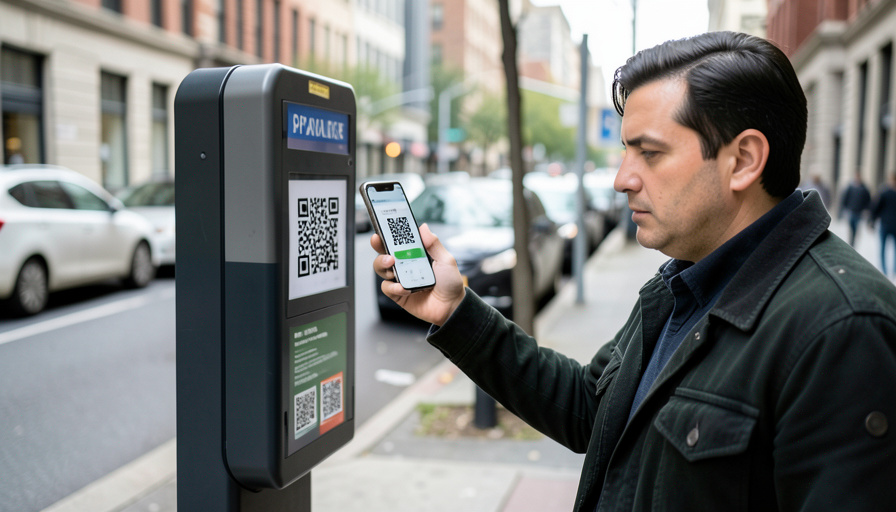
You find a spot on a busy street, walk up to the meter, and there it is: a QR code, right where you would expect it, inviting you to scan and pay from your phone. It is quick and convenient, so you scan. What you may not know is that the code could have been stuck there by a scammer, sending you to a fake payment page built to steal your card details. This trick even has a name now, quishing, and it has moved from a rare big-city stunt to something police in a number of US cities have flagged. So are QR-code parking scams actually common, and how worried should you be? Here is a straight answer, plus a simple way to pay without getting caught.
The honest picture is that most QR codes on parking equipment are legitimate, but the fake ones are real, spreading, and very hard to spot in the moment, which is exactly why they work. You do not need to panic every time you park, and you do not need to swear off paying by phone. You just need a short mental checklist so that a tampered code never gets your money. Let us look at how the scam works and what to check before you ever type in a card number.
The Short Answer
Yes, fake QR codes on parking meters are a real and growing scam, sometimes called quishing, and the Federal Trade Commission has warned about it while police in cities such as Denver and Austin have documented cases. Scammers stick their own QR code over the legitimate one, sending drivers to a clone site that harvests card details. It is not on every meter, and many QR codes are genuine, but it has spread beyond major downtowns. Treat any QR code on parking signage with caution: check for a sticker placed over another, verify the web address, and when in doubt pay at the meter or through the city’s official app instead.
Why the parking QR scam works
The whole trick relies on one blind spot: a QR code is unreadable to human eyes, so you cannot tell where it leads until you have already scanned it. Scammers exploit that by printing their own code on a sticker and pressing it directly over the real one on a meter, a pay station, or nearby signage. Your phone opens what looks like the city’s parking portal or a familiar app such as a well-known parking service, but it is a clone, and the card number, security code, and billing address you enter are captured instantly. It is cheap to do, blends in perfectly, and preys on people in a hurry, which is why the Federal Trade Commission has warned that scammers hide harmful links in QR codes to steal your information. Knowing the mechanism is what makes the checklist below easy to follow.
This article is general safety information, not legal or financial advice. Scam tactics and city parking systems vary and change, so follow the guidance posted by your local parking authority, and if you have entered card details on a suspicious site, contact your bank right away.
The checklist to pay for parking safely
- Look for a sticker over a sticker. The clearest sign of tampering is a QR code that looks stuck on, with a peeling edge, a slight misalignment, or a code pasted over another one. Give the meter a quick glance and a light touch, and if the code appears to be an add-on sticker rather than part of the machine, do not scan it.
- Be skeptical of QR codes on meters in general. Many cities do not put payment QR codes on their meters at all, and some have said so directly, directing drivers to the physical meter or a named app instead. If a QR code appears where your city normally does not use one, treat that as a warning rather than a convenience.
- Pay another way when you can. The simplest defense is to skip the code entirely and pay at the physical meter with a card or coins, or through the official parking app you already have. Scanning a code on the street should be your last option, not your first, especially when a tap-to-pay meter is right in front of you.
- Check the web address before entering anything. If you do scan, look hard at the URL that opens before you type a single digit. Confirm it is the genuine city or parking-vendor domain, that it uses a secure https address, and that there are no odd misspellings, extra words, or a strange country ending. Clone sites rely on you not reading the address.
- Get the official app from your phone’s app store. Download your city’s parking app or a legitimate service directly from the official app store, not by scanning a code on the street. Set it up before you need it, and pay through the app you know, so a roadside QR code is never the thing standing between you and a valid payment.
- Notice what the payment page asks for. A real parking payment needs your plate, the zone or space, the time, and a card. Be suspicious if the page asks for excessive personal details, account logins, or wants you to install something through the scanned link. Unusual requests are a sign you are on a page built to harvest data, not to sell you parking.
- Confirm the operator matches the signage. The app or site you land on should match the parking operator named on the meter or the posted signs. If the meter says one thing and the payment page brands itself as something unrelated, stop, because a mismatch between the equipment and the site is a classic sign the code was swapped.
- Act fast if you already paid through a suspicious code. If you entered card details and then had doubts, contact your bank or card issuer immediately to flag the transaction and protect the card, watch for unfamiliar charges, and report the scam to the FTC at ReportFraud.ftc.gov and to your local parking authority. Quick action gives you the best chance to limit any damage.
How worried should you actually be?
Keep this in proportion. The vast majority of parking QR codes are legitimate, and paying for parking by phone is not something you need to avoid altogether. What has changed is that the fake-sticker version of the scam is no longer confined to a handful of big downtowns, so a little caution is now worth the few seconds it takes. Think of it the way you would a card skimmer on a gas pump: rare enough that you should not be anxious, common enough that a quick check before you pay is just sensible. Glance for a stuck-on sticker, prefer the physical meter or your official app, and read the web address if you do scan. Do those small things by habit, and you get all the convenience of paying by phone with almost none of the risk. The scam depends on people moving too fast to look, so simply slowing down for a moment defeats it.
Main Takeaways
- Fake QR codes on parking meters are a real, growing scam, warned about by the FTC and documented by police in several US cities.
- Most parking QR codes are legitimate, but a tampered one is hard to spot, so a quick check before paying is worth it.
- Look for a sticker placed over another, and be wary of QR codes on meters in cities that normally do not use them.
- Prefer paying at the physical meter or through an official app downloaded from your app store, not a scanned street code.
- If you scan, verify the web address and what it asks for, and act fast with your bank if you paid through a suspicious code.
For more driving and scam-awareness guides, browse the DelightfulBlogs Automotive section, or see our guide to protecting your family from AI voice scam calls.
Frequently Asked Questions
Are fake QR codes on parking meters really a thing?
Yes. Scammers place a sticker with their own QR code over the legitimate one on a meter or pay station, so drivers who scan it land on a clone payment site that steals card details. The FTC has warned about QR code scams, and police in cities including Denver and Austin have documented fake parking stickers. It does not happen at every meter, but it is a genuine and spreading problem.
How can I tell if a parking QR code is fake?
You usually cannot tell from the code itself, so look at the physical clues and the destination. Check whether the code is a sticker placed over another, with a peeling edge or misalignment, and after scanning, read the web address carefully for the correct city or vendor domain, a secure https, and no odd spellings. If anything looks off, or the page asks for unusual information, do not enter your card.
What is the safest way to pay for street parking?
Pay at the physical meter with a card or coins when you can, or use your city’s official parking app downloaded directly from your phone’s app store. Setting up the official app before you travel means you never have to rely on a QR code stuck to a meter. If you must scan a code, verify the web address matches the real parking operator before entering any payment details.
Which cities have reported the parking QR scam?
Police departments in cities such as Denver and Austin have documented fake QR stickers on parking equipment, and reports have spread from large downtowns to smaller cities. Some cities have publicly stated they do not use QR codes on their meters at all. Because it varies by location, follow your own city’s guidance and treat an unexpected QR code on a meter with extra caution.
What should I do if I already scanned and paid?
Act quickly. Contact your bank or card issuer right away to report the possible fraud and protect the card, then watch your statements closely for unfamiliar charges and dispute any you did not make. Report the scam to the FTC at ReportFraud.ftc.gov and to your local parking authority so they can remove the sticker and warn others. Fast action gives you the best chance to limit the damage.
The Bottom Line
So are QR-code parking scams common? They are real, growing, and now reported well beyond the biggest cities, but they are still the exception rather than the rule, and you do not need to fear every meter. The move that keeps you safe is small: before you pay, glance for a sticker stuck over the real one, prefer the physical meter or an official app you already trust, and read the web address if you do scan. The scam works only on people rushing to pay without looking, so a few seconds of attention is all it takes to park, pay, and walk away with your card details intact.